
Written by Paul Malinda | Crises Control Marketing Assistant
Crisis management tools fail in the first 10 minutes of an incident more often than organisations realise.
It is 9:17am on a Tuesday. Systems are down. Staff cannot access applications. Customers are already reporting issues. Leadership is asking the only question that matters: what is happening?
You open the crisis management platform. It takes 90 seconds to load. You search for the right plan. The plan references a contact who left the business eight months ago. The escalation workflow sends alerts to people who are unavailable.
Four minutes pass. Nothing has actually been done.
This is not theoretical. During the CrowdStrike outage in July 2024, a single defective update disrupted over 8.5 million systems globally, grounding flights, halting hospital operations, and exposing how quickly response structures break under pressure.
It happened again in March 2026, when organisations had minutes, not hours, to account for their people during real-world disruption.
Most crisis management tools work perfectly in a demo. The first 10 minutes of a real incident is where the difference between them becomes impossible to ignore.
Why the First 10 Minutes Define Everything
The first 10 minutes of a crisis are where most crisis management tools succeed or fail. They do not just start the response. They define how effective that response will be.
If communication is fast and targeted in the first 10 minutes, teams know what is happening and what to do. If it is slow or fragmented, they improvise. And improvised responses in a crisis are expensive, unpredictable, and difficult to account for afterwards.
The pattern is consistent across incidents and industries. Organisations that communicate early retain stakeholder trust even when disruption lasts days. Those that delay lose control of the narrative, the response, and often the outcome.
What happens in those first 10 minutes is determined almost entirely by what was built before the incident started. The platform, the workflows, the contact data, and the escalation logic. If any of this fails under pressure, the response fails with them. This is the insight behind why most crisis management plans fail not in principle, but in the moment, they are needed most.
Five Ways Crisis Management Tools Fail When It Counts
The failure modes are consistent across organisations and across incidents. Understanding them is the fastest way to see what actually separates tools that work from tools that do not.
1. They are too slow to activate
Many crisis management tools require users to log in, navigate modules, locate plans, and manually trigger actions before anything happens. Under pressure, this delay compounds quickly.
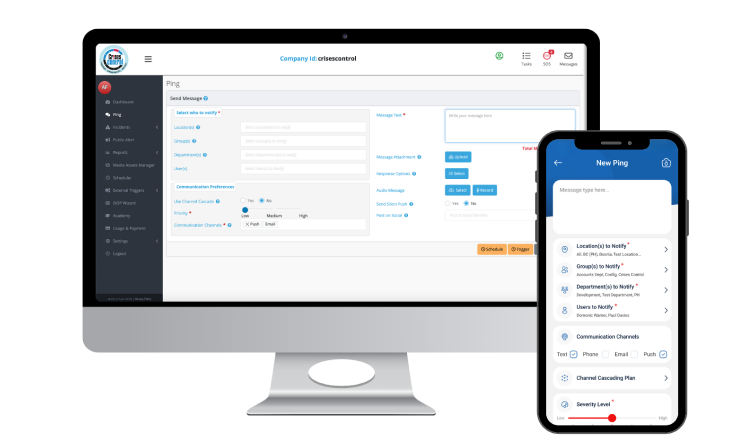
Crises Control is built for activation speed. Incidents can be logged, and workflows triggered within seconds, from a mobile device, by anyone with the right permissions. The Ping mass notification system reach employees across SMS, push notification, voice, and email simultaneously, without requiring a user to manually select channels or work through a contact list.
2. Their contact data is out of date
Most crisis management tools rely on manual updates. In practice, this means contact lists, escalation paths, and roles are often outdated.
The result was simple. Alerts go to the wrong people. Escalations fail. Tasks land with the wrong owner. And this only becomes visible when it is already too late to fix
3. They fragment communication across channels
When a crisis starts, teams reach for whatever tools they use day to day. Email, WhatsApp, phone calls, Slack. The result is that information about the same incident is spread across multiple channels simultaneously, with no single record of what was sent, to whom, and whether it was received. Leaders lose visibility. Teams receive conflicting information. The response fractures.
The organisations most exposed to this failure are those that have a crisis management platform but have not made it the authoritative channel during an incident. Crises Control addresses this by becoming the single operational environment from the moment an incident is logged. Every alert, task, and update goes through one place, with full audit trail created automatically as events unfold.
4. They have no live visibility for leadership
Senior leaders during a crisis do not need more information. They need the right information, in real time, in a format that supports decisions rather than requiring them to be assembled from raw data.
Most platforms provide dashboards. But those dashboards often show system status rather than response status. They tell leaders what the platform is doing, not what the organisation is doing. The question that matters during an incident is not whether an alert was sent. It is whether the right people received it, acknowledged it, and acted on it.
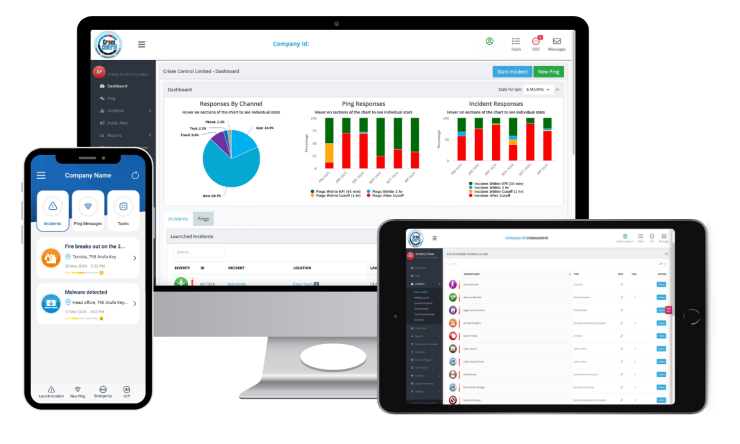
Crises Control’s leadership dashboard shows exactly who has been notified, who has confirmed, which tasks are complete, and where the gaps are. That visibility is what allows fast, informed decisions under pressure rather than decisions made on incomplete information.
5. They are built for the demo, not the drill
The crisis management software market is full of platforms that look compelling in a structured demonstration. The interface is clean. The workflows fire correctly. The alerts arrive on cue.
Real incidents do not run on cue. They start without warning, in the middle of other priorities, with the people who know the system best often unavailable. A tool that requires familiarity to use correctly under pressure is a tool that will be bypassed when pressure arrives.
This is why ease of use under stress is not a secondary consideration. It is the primary one. Independent reviews on Capterra and G2 consistently highlight Crises Control’s usability in real-world conditions as one of its strongest differentiators. It is designed to be used by people who are under pressure, not people who have just completed a training session.
The Assumption That Gets Organisations Into Trouble
The most dangerous assumption in crisis management is that having a tool is the same as being prepared.
Organisations invest in platforms, tick a compliance box, and move on. The platform is tested during onboarding, updated occasionally, and stored somewhere that someone theoretically knows about. When an incident arrives, that investment returns almost nothing because the tool was never made operational. It was made available.
There is a significant difference between a tool that exists and a tool that works. That difference only becomes visible in the first 10 minutes of a real incident.
The organisations that get maximum value from crisis management software are the ones that treat it as an operational system rather than a contingency document. They run regular drills. They keep contact data current. They test escalation paths against real scenarios. They make sure that anyone who might need to activate the platform at 2am on a Sunday can do so without thinking about it.
This is what incident response automation is really about. Not removing humans from the response but removing the friction that slows humans down when the pressure is high.
What the Rest of the Market Gets Wrong
The crisis management software market has two dominant failure modes at opposite ends of the spectrum.
At the enterprise end, platforms like Everbridge and BlackBerry AtHoc are powerful and comprehensive. They offer deep threat intelligence, geofencing, global infrastructure, and extensive integration capabilities. They are also expensive, complex to implement, and require dedicated administrators to maintain. For large government agencies and critical infrastructure operators, that trade-off makes sense. For most organisations, complexity becomes a barrier to actual use, particularly in the first 10 minutes of an incident.
On the other hand, basic notification tools send alerts and stop there. They do not assign tasks, track acknowledgement, support escalation logic, or create an audit trail. They solve one part of the problem and leave the rest to be managed manually.
Crises Control sits in the space that matters for most organisations: a platform that is fast to activate, straightforward to use under pressure, and comprehensive enough to handle the full response lifecycle from first alert through to post-incident review. ISO 27001 and GDPR compliant, with 24/7 technical support and dedicated account management, it is built to scale from mid-sized businesses to multinational enterprises without requiring a complete IT overhaul or a specialist team to keep it running.
What Crises Control Does in the First 10 Minutes
Here is exactly what happens when an incident is logged on Crises Control, from the moment it starts.
- An incident is created, on a desktop, tablet, or mobile, by anyone with the right permissions. No login maze. No plan-hunting. The interface is designed to get from zero to active response in under 60 seconds.
- Once an incident is launched, predefined workflows are triggered instantly, removing the need to coordinate the response manually under pressure. Tasks are automatically assigned to the appropriate teams based on predefined roles and escalation paths. The Ping mass notification system fires simultaneously across SMS, push notifications, voice call, and email, reaching everyone relevant regardless of where they are or which channel they are most likely to see.
- Two-way communication opens immediately. Employees can confirm their safety status, report their location, or flag that they need assistance. That information flows back to the response team in real time, not when someone has time to chase it.
- Leadership sees a live dashboard showing who has been notified, who has confirmed, which tasks are in progress, and where the gaps are. Decisions can be made on current information rather than best estimates.
- Every action is logged automatically. The time an alert was sent, who received it, who acknowledged it, which tasks were completed and when. By the time the incident is over, a complete audit trail exists without anyone having to create it.
That sequence, from logged incident to coordinated response with full visibility, takes under 10 minutes. For most of the tools in this market, 10 minutes is when the first alert is still being composed.
Interested in our Ping Mass Notification Software?
Efficiently alert everyone in seconds at scale with our Mass Notification Software.
Who Crises Control Is Built For
Crises Control is built for organisations that need a serious response capability without enterprise-level complexity or enterprise-level cost.
It works for organisations across sectors, including financial services, healthcare, logistics, retail, manufacturing, and education, where the common requirement is the ability to reach people fast, coordinate response across distributed teams, and maintain visibility and accountability throughout.
It is particularly effective for:
- Organisations with staff across multiple sites, time zones, or countries who need to be reached simultaneously with targeted, role-specific information
- Operations that are subject to regulatory scrutiny, where an audit trail of the response is as important as the response itself
- Teams that have experienced the failure mode of fragmented communication during a real incident and understand what a structured emergency communication approach needs to deliver
- Leadership teams that need real-time visibility of incident status without having to chase updates from individual teams
It is designed for organisations that need fast, structured crisis response across teams, locations, and systems. For government agencies managing large-scale national emergency operations or organisations with advanced threat intelligence requirements, Crises Control complements these needs with capabilities such as geofencing and targeted communication.
The platform is built to deliver coordinated response, real-time visibility, and multi-channel communication at scale, while integrating into broader risk and intelligence ecosystems where required.
The Takeaway
Crisis management tools fail in the first 10 minutes for reasons that are entirely predictable and entirely preventable. Activation is too slow. Contact data is out of date. Communication fragments across channels. Leadership loses visibility. The tool requires training to be used at the exact moment nobody has time to think.
These are not the failures of bad intentions. They are the failures of tools designed to look good in controlled conditions rather than work under genuine pressure.
Crises Control is built around the opposite principle: that the only test of a crisis management platform is what it does in the first 10 minutes of a real incident. Fast activation. Targeted multi-channel alerts. Automated task assignments. Real-time leadership visibility. A complete audit trail created without adding a single extra task to the people managing the response.
The next incident will not announce itself in advance. It will not wait for your team to be trained or your contact list to be updated. The question is whether your response structure is ready for it right now. See what Crises Control looks like in practice and find out.
Most tools look ready. Fewer actually are. See exactly what Crises Control does in the first 10 minutes of a real incident. Book a free personalised demo and test it against your own scenarios.
Request a FREE Demo
FAQs
1.Why do most crisis management tools fail during real incidents?
Most tools fail because they were designed for structured conditions rather than real-world pressure. Activation takes too long. Contact data goes out of date between incidents. Communication fragments across channels. Leadership loses visibility. And the tools require familiarity to operate correctly at exactly the moment when stress makes familiarity unreliable. The result is that the first 10 minutes, which determine the shape of everything that follows, are lost before the response has properly started. Read more about why crisis management plans fail in practice.
2.What should a crisis management platform do in the first 10 minutes?
In the first 10 minutes, a crisis management platform should log the incident, activate predefined response workflows automatically, send targeted multi-channel alerts to the right people, open two-way communication to track acknowledgement and status, give leadership a live picture of the situation, and begin logging every action for the audit trail. All of that should happen without anyone needing to compose messages from scratch, search for contact details, or manually coordinate which team is doing what.
3.How is Crises Control different from other crisis management tools?
Crises Control is built for speed and usability under real pressure rather than structured demonstrations. It activates in under 60 seconds, sends alerts across all channels simultaneously through the Ping mass notification system, automates task assignment, gives leadership real-time visibility, and creates a complete audit trail automatically. It is ISO 27001 and GDPR compliant, available with 24/7 support, and scales from mid-sized organisations to multinational enterprises without specialist administration.
4.What happens if our crisis management tool fails during an incident?
If a tool fails during an incident, teams default to informal communication channels: phone calls, messaging apps, email. Information fragments. Accountability disappears. The response becomes impossible to coordinate or document. This is why infrastructure resilience matters as much as features. Crises Control runs on its own cloud infrastructure with data centre locations across multiple regions, ensuring the platform remains operational even when corporate systems are under strain.
5.How often should crisis management tools be tested?
Crisis management tools should be tested at least quarterly, with contact data reviewed and updated every time an employee changes roles or leaves the organisation. Escalation paths should be validated against current team structures. Response workflows should be run against realistic scenarios rather than theoretical ones. The organisations that respond best in real incidents are not the ones with the most detailed plans. They are the ones that test those plans often enough that the tool feels familiar under pressure.