Written by Anneri Fourie | Crises Control Executive
When something goes wrong at a live event, confusion spreads faster than information.
A ticketing system goes down minutes before doors open. A power fault disrupts sound and lighting mid-performance. A security incident forces parts of a venue to close while thousands of people are already inside. In each case, the technical problem is only part of the risk. The bigger challenge is how quickly and clearly people are informed.
Many entertainment venues still rely on a mix of manual calls, WhatsApp messages, radio chatter, and public announcements. These methods work when pressure is low and teams are small. They struggle when events are live, crowds are large, and decisions need to be made in minutes.
A Mass Notification System provides a structured way to communicate during disruption. Used properly, it helps venues regain control, reduce uncertainty, and guide people through situations that would otherwise escalate.
This article explains why emergency alerts are difficult in entertainment environments, where current approaches fall short, and how venues can build communication practices that hold up under real pressure.
What is a Mass Notification System?
A Mass Notification System is a digital platform used to send time-critical messages to large groups of people through multiple channels such as mobile apps, SMS, email, voice calls, and collaboration tools like Microsoft Teams.
In entertainment venues, it is used to:
- Alert staff and contractors to incidents
- Share instructions during safety or operational issues
- Inform attendees about delays, changes, or actions they need to take
- Keep leadership teams aligned during unfolding situations
A well-designed system does more than send messages. It supports targeted communication, tracks who has received and acknowledged alerts, and links messages to incident response actions.
Clarity matters here. Many venues assume mass notification is just broadcasting information. In practice, it is about directing behaviour when conditions are unpredictable.
Why emergency alerts are harder in entertainment venues
Entertainment venues operate very differently from offices or industrial sites. Several factors make emergency communication more complex.
High density and emotional environments
Crowds are noisy, distracted, and emotionally engaged. Alcohol, lighting, and sound all affect how people process information. Messages need to be short, clear, and repeated through channels people already trust.
Fixed timelines and live operations
Events do not pause while teams coordinate. Performances, broadcasts, and competitions continue unless deliberately stopped. Delays in communication quickly become safety, revenue, and reputation issues.
Interdependent systems
Ticketing, access control, payments, lighting, sound, broadcast systems, and power infrastructure are tightly connected. A technical failure in one area often affects several others, turning internal issues into public ones.
Multiple stakeholder groups
Staff, security teams, performers, suppliers, regulators, and attendees all need different information at different times. Sending the same message to everyone usually creates confusion.
These pressures explain why generic alerting tools or improvised communication methods struggle when venues are under stress.
A realistic failure scenario
Consider a sold-out arena event. Doors are open, queues are building, and the ticket scanning system fails due to a backend outage.
Front-of-house staff do not know whether to pause entry or switch to manual checks. Security teams receive partial information through radio chatter. Attendees see queues stop moving and start sharing speculation on social media. Senior managers are pulled into calls while trying to understand what is actually happening.
No single failure causes the disruption. The problem is fragmented communication.
This scenario is common, and it shows why alerting needs structure, not speed alone.
Common incident scenarios that require mass notification
Entertainment venues rarely deal with one type of emergency. Most face a mix of operational, technical, and safety-related incidents.
Typical scenarios include:
- Ticketing or access control outages
- Power failures affecting lighting or sound
- Cyber incidents disrupting payments or betting platforms
- Severe weather impacting outdoor events
- Medical emergencies in public areas
- Crowd management issues or partial evacuations
- Fire alarms or false activations
- Security threats requiring controlled response
Each scenario requires a different communication approach. Treating all incidents the same leads to alert fatigue, delays, or silence when guidance is needed.
Emergency mass notification system for venues: what actually works
An emergency mass notification system for venues needs to support precision, not just reach.
Role-based targeting
Security teams, technical crews, front-of-house staff, and leadership need different instructions. Systems that force one message to all recipients slow response and increase risk.
Multi-channel delivery
Relying on a single channel assumes ideal conditions. Mobile networks may be overloaded, Wi-Fi may fail, and screens may be offline. Redundancy is essential.
Escalation logic
If messages are not acknowledged, they need to escalate to supervisors or alternate teams. Silence should trigger action, not acceptance.
Integration with incident workflows
Alerts should be linked to predefined response actions. When notifications sit outside incident management processes, teams waste time clarifying responsibilities.
Crises Control supports this approach by linking alerts directly to digitalised incident plans and role-based tasks, helping teams move from awareness to action.
Crisis management software for live events: beyond broadcast alerts
Many venues assume that sending messages equals managing incidents. Live events expose the limits of this thinking.
Crisis management software for live events connects alerts to decisions, actions, and accountability. It allows teams to:
- Launch predefined incident scenarios
- Assign tasks based on role and location
- Track progress in real time
- Maintain a clear record of actions and communications
Without this structure, coordination relies on informal messaging apps and phone calls. These tools fragment information, create conflicting instructions, and leave no reliable record of what happened.
During high-pressure events, this gap becomes visible very quickly.
Staff and attendee communication: different needs, same incident
One of the most common mistakes is treating staff and attendee communication as the same problem.
Staff communication needs instruction
Staff need to know:
- What has happened
- What actions they are responsible for
- Who is leading the response
- When updates will follow
Messages should be practical and linked to roles.
Attendee communication needs reassurance
Attendees need:
- Acknowledgement that the issue is known
- Clear guidance on what to do
- Confidence that safety is being managed
Too much detail creates anxiety. Silence creates speculation. Clear, timely updates help maintain order and trust.
Effective venues separate these communication streams while keeping them consistent.
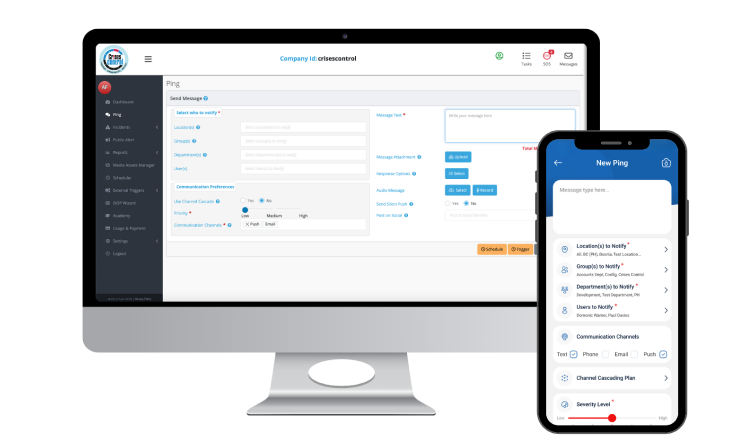
Interested in our Ping Mass Notification Software?
Efficiently alert everyone in seconds at scale with our Mass Notification Software.
Using client-facing screens as part of emergency alerts
Digital signage, concourse screens, and broadcast overlays are powerful communication tools during disruption.
Used well, screens can:
- Reinforce mobile alerts with visual guidance
- Direct crowd movement during evacuations
- Provide reassurance during delays or outages
- Reduce pressure on staff answering questions
Problems arise when screens are treated as static assets. If updates require manual intervention or long approval chains, information becomes outdated quickly.
Crises Control integrations allow alerts and status updates to be shared consistently across internal channels and client-facing screens, helping messages stay aligned.
Emergency communication solutions for multi-site venues
Operators managing multiple venues face extra complexity.
Common challenges include:
- Different local regulations
- Varying layouts and evacuation routes
- Mixed levels of staff experience
- Time zone differences for central teams
Emergency communication solutions for multi-site venues need to balance local control with central oversight.
Effective models include:
- Standardised incident templates
- Localised message content
- Central visibility of active incidents
- Shared reporting and review processes
Clear ownership of templates and regular reviews help avoid drift while allowing local teams to respond appropriately.
Manual processes vs digital systems under pressure
Many venues still rely on printed plans, shared folders, and informal call trees. These approaches appear workable during planning and exercises.
They struggle during live incidents because:
- Information is static
- Access depends on location
- Updates are slow and inconsistent
- Knowledge sits with individuals rather than roles
Digital systems introduce trade-offs. They require training, governance, and upkeep. They also depend on connectivity.
The balance shifts when systems are designed for resilience. Cloud-based platforms with mobile access and offline capability reduce reliance on physical documents and memory.
Crises Control focuses on turning static plans into accessible, role-specific actions that remain available even when primary systems are disrupted.
Compliance, accountability, and post-incident review
Entertainment venues operate under increasing scrutiny. Health and safety obligations, data protection requirements, and duty of care expectations apply during emergencies as much as normal operations.
A Mass Notification System supports accountability by:
- Logging who was alerted and when
- Recording message content
- Tracking acknowledgements and actions
- Supporting post-incident review and reporting
This is not about paperwork. It provides evidence that decisions were reasonable and timely.
Challenging a common assumption: more alerts mean better safety
A common belief is that sending more messages improves safety. In practice, excessive alerts reduce trust and response rates.
Over-alerting leads to:
- Alert fatigue
- Delayed acknowledgements
- Staff ignoring messages
- Attendees dismissing instructions
Effective venues define clear thresholds for alerts and design message types carefully. Precision builds confidence and improves response.
Decision logic built into crisis management platforms supports this discipline better than ad-hoc messaging.
Testing, simulations, and human factors
Technology alone does not guarantee performance.
Regular testing through:
- Simulated incidents
- Tabletop exercises
- Ping messages to validate reach
helps identify gaps in contact data, training, and decision-making.
Stress, authority gradients, and cognitive overload affect how people respond. Systems should simplify choices and reinforce clarity.
Where Crises Control fits in real operations
Crises Control supports venues by:
- Digitalising crisis and business continuity plans
- Enabling role-based, actionable incident response
- Providing reliable emergency communication
- Offering cloud-based access during disruptions
- Maintaining clear audit trails for review
The platform is designed to support real operational conditions rather than idealised workflows.
Next steps
Emergency alerts are not just a technical feature. They shape how people behave when situations are uncertain and pressure is high.
If you are reviewing how your organisation manages emergency alerts, incident response, or multi-site coordination, this is a good point to assess whether your current approach would hold up during a live event.
Request a FREE Demo