Written by Anneri Fourie | Crises Control Executive
Design agencies live and breathe deadlines, creativity, and client expectations. When something disrupts a project, whether a sudden office closure, IT outage, or an employee being unable to work remotely, it doesn’t just affect internal operations. Delays ripple out to clients, causing missed deadlines, lost revenue, and damage to the agency’s reputation.
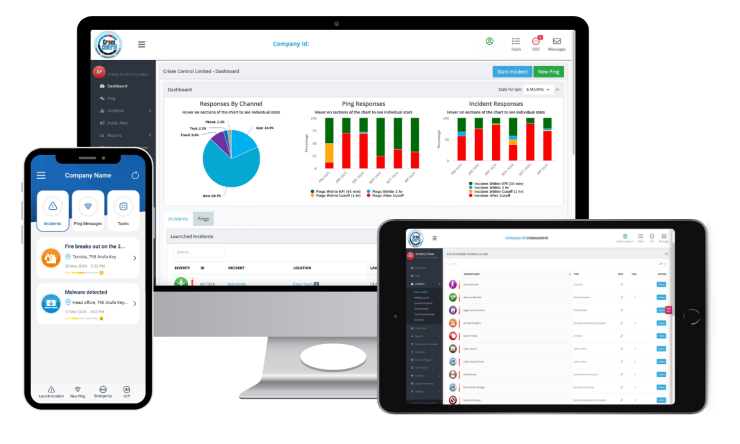
Business continuity software is a tool that helps agencies respond to these disruptions quickly and effectively. It turns static, paper-based plans into digital, actionable workflows. By centralising emergency communication, incident management, and continuity plans, it helps teams keep client projects on track even when unexpected events occur.
At its core, business continuity software ensures that staff know what to do, how to communicate, and who is responsible during a disruption. For design agencies, this means creative work continues, clients are kept informed, and revenue streams are protected.
Why Design Agencies Struggle with Continuity
Design agencies are structured around collaboration, creativity, and flexibility. These qualities create unique continuity challenges.
Distributed Teams and Remote Work
Many agencies operate across multiple offices, studios, and home locations. A designer in London may be working on the same project as someone in Dubai. When a disruption hits, coordinating these teams becomes a challenge. Emails can be missed, phone calls delayed, and simple miscommunication can push deadlines back.
Slow Crisis Communication
If a fire alarm goes off, a server fails, or a key team member cannot work, delays in communication can have real consequences. Without a rapid way to alert everyone, client deliverables can slip, creating friction and eroding trust.
Lack of Structured Response
Creative teams often rely on informal processes to solve problems. Without a predefined response plan, decisions are made ad hoc, leading to inconsistencies and mistakes. A missed step can delay a project, affect client satisfaction, and cost the agency money.
Safety Risks in Offices or on Site
Fires, severe weather, building access issues, or other safety incidents can interrupt operations. Staff safety is the top priority, but even minor incidents can stop creative work. Agencies need a system to inform teams quickly and ensure everyone is accounted for.
Client Communication During Disruptions
Clients expect updates when issues arise. Without a coordinated internal response, messages may be delayed, inconsistent, or incomplete. This creates frustration and jeopardises client relationships.
How Business Continuity Software Solves These Problems
Business continuity software for design agencies to protect client projects addresses these challenges by providing a clear, structured, and accessible system to manage disruptions.
Real-Time Alerts Through an Emergency Mass Notification System
Delays in communication are one of the biggest reasons projects fall behind. An emergency mass notification system for multi-location creative teams allows agencies to:
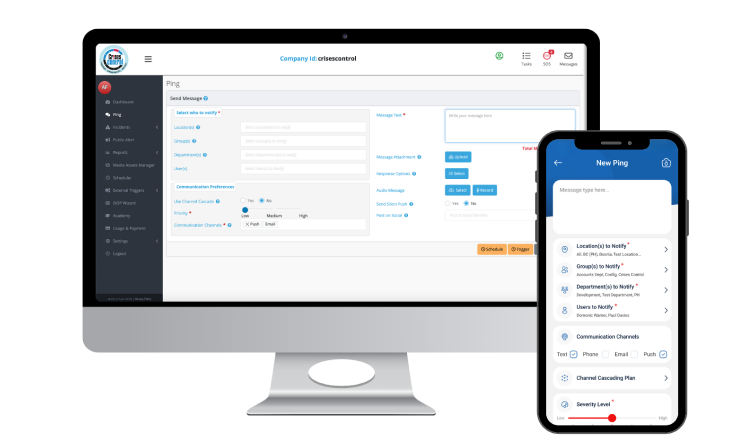
- Send instant alerts via mobile app, SMS, email, or voice
- Track acknowledgements to ensure everyone has received the message
- Reduce downtime from office closures, IT outages, or other disruptions
For example, if a server hosting design files goes offline, the mass notification system can instantly alert designers, project managers, and IT support. Everyone knows the situation, reducing confusion and allowing staff to adjust their work immediately.
Structured Incident Response
A reactive, informal approach often leads to mistakes. An incident management platform for safeguarding client deliverables during disruptions provides:
- Predefined workflows for common disruptions
- Role-based task assignments to ensure the right people act at the right time
- Centralised logs for accountability, reporting, and compliance
If a designer’s workstation is damaged, the system automatically notifies IT, assigns backup workstations, and updates project managers. The incident is documented, decisions are tracked, and teams can continue work with minimal delay.
Digitalised Business Continuity Plans
Static PDFs or spreadsheets are slow to access and difficult to update. Digital continuity platforms:
- Give teams on-demand access from any location, including mobile
- Automatically assign responsibilities to the right staff
- Link incident response directly to project workflows and deliverables
This means that even if an office is closed, teams can continue working from home, follow predefined procedures, and ensure projects stay on schedule.
Interested in our Ping Mass Notification Software?
Efficiently alert everyone in seconds at scale with our Mass Notification Software.
Real Consequences of Poor Continuity
Design agencies that lack structured continuity face clear operational and financial risks:
- Client delays: Missed deadlines can damage contracts and trust. Even a short delay can have a knock-on effect on other projects.
- Revenue loss: Downtime reduces billable hours, leading to direct financial impact.
- Reputation damage: High-profile projects that fail to meet expectations can harm the agency’s reputation and future business opportunities.
- Regulatory compliance risks: Agencies working internationally must meet GDPR, ISO 22301, or local civil defence standards. Poor documentation can lead to legal consequences.
Disruptions that seem minor can escalate quickly if there is no system to coordinate response and communicate effectively.
Common Mistakes Agencies Make
Even agencies aware of continuity risks often make the same mistakes:
- Relying on spreadsheets or PDFs instead of a digital platform
- Using slow communication channels such as email chains or phone trees
- Applying generic emergency plans to all projects without customisation
- Ignoring compliance requirements for multi-site operations
- Assuming remote teams can coordinate effectively without a centralised system
These mistakes create gaps that only become visible during an actual incident, making recovery slower and more complicated.
Choosing the Right Tools
Selecting continuity tools involves understanding the trade-offs between manual and digital approaches.
| Requirement | Manual Approach | Digital Approach | Trade-Offs |
| Rapid alerts | Phone calls, emails | Emergency mass notification system | Requires setup and training but communicates faster and more reliably |
| Incident logging | Paper records | Incident management software | Digital logs provide accountability and compliance reporting |
| Plan access | Stored PDFs | Digital business continuity platform | Needs secure cloud hosting but accessible anywhere, including mobile |
| Team coordination | Ad hoc calls | Role-based workflows | Less flexible day-to-day but ensures critical actions are not missed |
Digital platforms centralise operations, reduce dependence on memory, and ensure tasks are completed correctly, even under pressure.
Questioning the “One-Size-Fits-All” Approach
Some agencies assume that a standard emergency plan is enough. In practice, this is rarely true:
- Different projects have varying client expectations, deadlines, and dependencies
- Local regulations and safety requirements differ between offices and regions
- Remote teams add complexity in communication
- High-value projects require faster, more precise responses than routine operations
Business continuity software allows teams to customise workflows per project. This ensures critical client deliverables remain on track even when multiple disruptions occur at once.
How Agencies Benefit
Using business continuity software provides clear, measurable advantages:
- Reduced downtime and fewer missed client deadlines
- Improved employee safety and accountability
- Centralised, auditable incident management
- Faster, coordinated internal and client communication
- Compliance support across multiple sites and regions
Digital tools, like Crises Control, also help agencies make informed decisions during disruptions, reducing guesswork and human error.
Real-World Example
Consider a design agency with teams in London, Dubai, and Toronto working on a high-stakes client project.
A sudden IT outage in London stops access to shared design files. Without digital continuity tools, teams wait for emails or phone updates. Deadlines slip, and client communication is fragmented.
With business continuity software, the agency:
- Sends immediate alerts via the emergency mass notification system
- Activates a predefined workflow for IT outages
- Assigns backup tasks automatically to remote team members
- Updates the client consistently through a centralised communication channel
The project continues with minimal disruption, clients remain informed, and revenue is protected.
Final Thoughts
Maintaining client projects during disruptions is more than a planning exercise. For design agencies, the impact of missed deadlines or unclear communication can be costly. Digital business continuity solutions centralise emergency communication, incident management, and actionable workflows, giving teams clarity and confidence when unexpected events occur.
Agencies that adopt business continuity software protect client projects, maintain revenue, and strengthen resilience across operations. Cloud-based access, structured workflows, and instant alerts ensure teams can continue delivering value, regardless of the situation.
Request a FREE Demo