
Written by Dr Shalen Sehgal | Crises Control
An employee SOS panic button is a one-press emergency alert mechanism, built into a mobile app or worn as a physical device, that instantly notifies every designated responder of an incident, transmits the worker’s location, and triggers a structured emergency response without the worker needing to make a call, find a number, or reach a supervisor. On a construction site, where a scaffold can fail in under a second and a worker in a confined space can lose consciousness before anyone nearby notices, it is the single fastest link between a life-threatening event and the people who can stop it from becoming fatal.
Most construction sites believe they have this covered. They have radios. They have first-aiders. They have a noticeboard in the site office with emergency numbers on it. What they do not have is a mechanism that any person on site, including subcontractors, labourers, and lone workers, can trigger in under two seconds that simultaneously alerts the site manager, the safety officer, the contracts manager, and the emergency services coordinator with a single press.
On most construction sites, the first alert depends on someone making a decision, finding a number, and making a call. That delay is where incidents escalate.
That gap is not a minor administrative oversight. It is, in many serious construction incidents, the difference between a controlled response and fatality.
This blog sets out why construction sites specifically need a dedicated employee SOS panic button, what the technology delivers that radios and phones cannot, how it fits into a wider emergency response system, and what to look for when choosing a panic button app for a multi-employer construction environment.
The issue is not whether an alarm can be raised. The issue is whether a response starts immediately or minutes later.
Why Construction Sites Need an Employee SOS Panic Button More Than Almost Any Other Workplace
Every industry with a safety risk benefits from fast incident alerting. But construction concentrates multiple high-risk factors in a single environment in a way that makes the standard response pathway, calling a number or finding a supervisor, inadequate.
Workers move through hazardous zones continuously.
In an office, a worker who collapses near their desk is likely to be seen within seconds. On a construction site, a worker in a confined space, on a roof, or operating in a segregated zone may be out of sight of any colleague for extended periods. Without a personal emergency panic button that the worker can activate themselves, the incident may not be discovered until the next scheduled check-in.
The Health and Safety Executive reported that in 2022/23, 45 workers were killed in the construction industry in Great Britain (HSE 2023). Many of these incidents involved delays in discovery or response. Time is not a manageable variable in these scenarios. It is the variable.
Multi-employer sites fragment accountability.
A large construction site may have 15 or 20 different employers operating simultaneously. Each has its own supervisory chain, its own safety procedures, and its own communication tools. When an incident involves a subcontractor’s operative, the general contractor’s standard communication chain may not even know the person’s name, let alone have a mechanism to alert them or account for them.
An employee SOS panic button deployed across all parties on site, directly employed workers and subcontractors alike, creates a single alerting layer that is not dependent on any individual employer’s internal procedures. One press activates the site-wide response, regardless of which company’s payroll the worker is on.
Lone workers have no passive safety net.
Lone working on construction sites is common and regulated under the Management of Health and Safety at Work Regulations 1999. Surveyors, utility workers, and specialists frequently work in isolation. For these workers, there is no colleague to notice that something has gone wrong. There is no passive safety net. The only mechanism that can trigger a response is the worker themselves, which means the emergency panic button they carry must work without signal dependency, with a low-friction activation that functions even if the worker is disoriented or partially incapacitated.
What an Employee SOS Panic Button Actually Does: The Full Response Chain
The term ‘panic button’ is familiar. The actual mechanics of what a well-built workplace panic button triggers are less widely understood. There is a significant difference between a button that sends a single text message to one number and a button that activates a coordinated, structured emergency response.
Here is what a properly integrated employee SOS panic button does from the moment it is pressed:
Step 1: Everyone who needs to act knows instantly
The press triggers simultaneous notifications across every channel configured for the site: push notification to the app, SMS, email, and voice call where required. Not a sequential chain where one person is told, who then tells the next.
With an SOS panic button, a broadcast is delivered in under 60 seconds to every person designated as an emergency responder for this incident type.
Delivery confirmation is tracked for each recipient. If a responder does not acknowledge within a defined timeframe, the alert escalates automatically to the next tier. The incident commander does not have to wonder whether the safety officer received the message. The platform confirms it.
Step 2: Location transmission
A GPS-enabled employee SOS panic button transmits the worker’s location at the point of activation. On a complex construction site with multiple structures, levels, and zones, this is not a minor convenience. It is the information that determines whether the first responder goes to the right place.
A 90-second delay caused by a first responder going to the wrong building on a site is not recoverable in a cardiac event or a crush injury.
The best panic button apps continue transmitting location updates after the initial alert, giving the incident commander a live track of where the worker is and, if relevant, whether they are moving.
Step 3: The response starts without waiting for instructions
A basic alarm tells people something has happened. A proper incident management system tells them what to do about it. When the employee SOS panic button is activated, the platform classifies the incident and triggers the pre-built response plan for that incident type. Medical emergency on Level 3 of Block B: a first-aider is dispatched, 999 is called by the safety officer, site access is confirmed by the security coordinator, and the area is cordoned by the section foreman. Every task is assigned to a named role. Every task has a completion timestamp.
Step 4: Personnel accountability
A panic button activation can simultaneously trigger a roll call across the affected zone or the entire site, depending on the incident type. Workers confirm their status through the app. Non-respondents are flagged automatically. The incident commander has a live accountability picture within minutes of the initial alert, without having to wait for manual muster checks at assembly points.
Step 5: Audit trail from first press to incident close
Every action is logged. The timestamp of the button press. Every alert sent. Every acknowledgement received. Every task assigned and marked complete. Every communication in the incident channel. This record is automatically preserved and forms the basis of the post-incident report required under RIDDOR, the investigation required by the HSE, and the documentation required by insurers and clients.
If your current system cannot do all five of these things automatically, your response depends on people improvising under pressure.
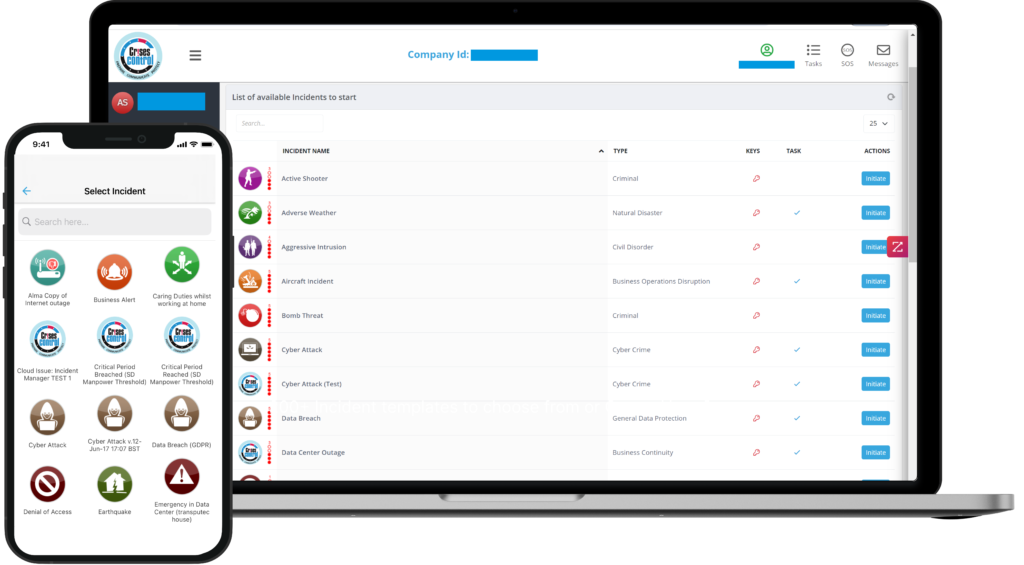
Interested in our Incident Management Software?
Flexible Incident Management Software to keep you connected and in control.
Why Radios and Mobile Phones Cannot Replace a Dedicated Workplace Panic Button
The argument against investing in a dedicated panic-button app usually goes as follows: workers already have phones. Workers already have radios. Both can be used to raise an alarm. Why invest in separate technology?
The answer is that phones and radios can raise an alarm. They cannot trigger a structured emergency response. And in a serious construction site incident, the alarm is the easy part.
In construction, the difference between a 60-second alert and a 5-minute delay is often the difference between a controlled incident and a fatal one.
Phones require cognitive function that injured workers may not have.
To raise an alarm by phone, a worker must unlock the device, navigate to the keypad or contacts, find the right number, wait for an answer, and articulate what has happened and where.
For a worker who is in pain, in shock, disoriented by smoke or fumes, or losing consciousness, none of these steps is reliable. A single button press, designed to be activated even by a worker lying on their side with one hand free, is categorically different.
Radios have no structured escalation logic.
A radio transmission tells whoever is monitoring the channel that something is wrong. It does not confirm who has heard the message. It does not assign tasks. It does not escalate if there is no response. It does not log the alert time or track subsequent actions. It has no role in accountability, audit, or post-incident documentation.
Consumer messaging apps have no incident structure.
WhatsApp and similar platforms are not emergency response tools. Messages can be missed. Notification sounds can be overridden by phone settings. There is no delivery confirmation. There is no task logic. There is no escalation path. And under UK data protection law and frameworks such as GDPR incident response requirements, a WhatsApp thread is not a compliant audit trail.
Most platforms can send alerts. They cannot, however, coordinate a response. What happens next depends entirely on the judgement and availability of whoever receives it, with no task structure, no escalation logic, and no audit trail built into the response workflow.
Workers using a dedicated emergency panic button reached a first responder an average of 4.2 minutes faster than workers relying on phone calls in simulated construction site emergency exercises (National Safety Council 2023)
Employee SOS Panic Button: 6 Requirements Specific to Construction Sites
Not all panic button apps are built for construction. Many are designed for retail workers, lone office workers, or healthcare settings. A construction environment imposes specific technical and operational requirements that generic solutions frequently fail to meet.
- Offline and low-signal capability. Construction sites, particularly in basement levels, underground utilities work, and remote locations, regularly operate in areas with poor or no mobile signal. A panic button app that requires full 4G connectivity to send an alert is not reliable in these environments. Look for platforms that queue alerts locally and transmit when the signal is restored and that support alternative network protocols.
- Subcontractor and visitor coverage. The emergency panic button deployment must extend beyond directly employed workers. Any person on site who could be involved in or witness an incident needs access to the alerting mechanism. This means the platform must support multiple tenancies, guest access, or pre-registration of subcontractor workforces before they arrive on site.
- Physical device option alongside the app. Not all construction workers carry smartphones. Some roles involve environments where phones are excluded for safety reasons (sparking risk, contamination). A physical workplace panic button, worn on the body or attached to equipment, must be available as an alternative to the app-based version.
- Geo-fencing and site zone mapping. Large construction sites are not single locations. A panic button alert that says the worker is on site is not useful. The platform should support site zone mapping so that when the button is pressed, the alert specifies the zone, level, and building reference, and routes the response to the correct local responders for that zone.
- Integration with the site emergency response plan. The panic button is the trigger, not the response. It must be integrated with a pre-built emergency response plan that activates automatically on press, assigns tasks, and manages escalation. A standalone alert with no downstream structure is a notification, not a response system.
- ISO 22320 and ISO 22301 alignment. The incident management structure triggered by the employee SOS panic button should conform to ISO 22320 (incident management) and the business continuity provisions of ISO 22301. This is increasingly required by major clients, principal contractors, and insurers as a condition of contract.
Implementing an Employee SOS Panic Button on a Construction Site: 5 Steps to Get It Right
A panic button that only sends a message does not solve the problem. It just tells you faster that you don’t have a response plan established. The technology is only as effective as the emergency response plan it triggers, the people who have been trained to respond to it, and the contact lists that have been built to cover everyone on site.
These five implementation steps are the minimum standard for a construction site deployment that will function under real incident conditions.
- Map the site and define incident zones before deployment. Divide the site into named zones with designated local responders for each. Configure the panic button platform to route alerts to the correct zone responders based on the location transmitted at the point of activation. A site-wide alert for every incident type is not efficient. A zone-routed alert with site-wide escalation for major incidents is.
- Build and test the emergency response plans before the site goes live. Every incident type that could occur on the site needs a pre-built response plan with named task owners, task deadlines, and escalation paths. These plans must be tested in a tabletop exercise and, where possible, a live drill before the site becomes operational.
- Register all parties, including subcontractors and regular visitors, before they come on site. The contact list must be complete before day one. A subcontractor whose operatives are not registered on the emergency notification system is a gap in the site’s accountability model.
- Train every user, not just the safety team. Every person on site with access to the panic button must understand how to use it and, critically, must not hesitate to use it if they see something wrong. Over-activation of a panic button is always preferable to delayed activation. Build this into site induction.
- Review the audit trail after every activation, including drills. Every panic button press, including test activations, generates data. Use that data. Response times, task completion rates, acknowledgement delays, and accountability gaps all surface from the incident log. Review after every drill and after every real incident. The response improves because the data shows where it failed.
How Crises Control Delivers the Employee SOS Panic Button for Construction Sites
The panic button is not the product. It is the trigger for an entire structured response system.
Crises Control is the execution layer between alert and resolution. The platform’s SOS panic button is designed for high-risk environments, including construction sites, where speed, reliability, and structured response are non-negotiable.
One press. Instant activation.
Every worker registered on the Crises Control platform has access to an SOS panic button within the app, accessible from the home screen without unlocking or navigating menus. Physical button hardware is also available for environments where smartphones are excluded. One press sends a geo-tagged alert to every designated responder on the site’s emergency contact list simultaneously.
Multi-channel mass notification
The alert is delivered via the mass notification system across push notification, SMS, email, and voice call simultaneously. Delivery receipts are tracked per recipient. If a primary responder does not acknowledge within the configured timeframe, the alert escalates automatically to the next tier. No manual chasing. No assumptions about who has seen the message.
Automated task assignment from pre-built response plans
When the employee’s SOS panic button is pressed, Crises Control activates the appropriate emergency response plan for the incident type. Tasks are pre-assigned to named roles. Each task has a deadline and an escalation path. The incident commander sees task completion status in real time on the incident dashboard, without having to make a single phone call to chase progress.
Personnel accountability and roll call
A panic button activation can trigger an automatic roll call across the affected zone or the full site. Workers confirm their status through the app. Non-respondents are flagged to the incident commander within the configured timeframe. The accountability picture is live, not reconstructed from manual muster sheets after the fact.
Compliant audit trail and reporting
Every action taken through Crises Control from the moment the button is pressed is automatically logged and timestamped. The platform generates post-incident reports that satisfy RIDDOR documentation requirements, support HSE investigation processes, and provide the evidence base required by insurers and clients. The audit trail also supports GDPR incident response obligations where personal data is involved.
Subcontractor and visitor coverage
Crises Control supports multi-employer site deployments. Subcontractor workforces can be pre-registered and added to the site’s emergency contact list before they arrive. Visitor access can be configured for temporary alerting during site attendance. The emergency communication system covers everyone on site, not just the general contractor’s directly employed workers.
Regulations, Standards, and the Employee SOS Panic Button
The regulatory case for deploying an employee SOS panic button on construction sites is clear, even if no single regulation mandates the technology by name.
- The Health and Safety at Work Act 1974 requires employers to provide a safe system of work and adequate means for raising an alarm in an emergency. A manual phone chain does not meet this standard on a complex construction site.
- The Construction (Design and Management) Regulations 2015 require the principal contractor to have arrangements for managing emergencies on site, including welfare and first aid. A panic button system with automated escalation and accountability is a direct implementation of this requirement.
- RIDDOR requires notification of specified incidents to the HSE and documentation of the response timeline. Crises Control’s automatic audit trail provides this documentation without any additional administrative burden.
- ISO 22320 sets the international standard for incident management. The structure activated by the Crises Control employee SOS panic button, including command, coordination, task assignment, and logging, directly implements the ISO 22320 framework.
- ISO 22301 governs business continuity. For construction firms with multiple simultaneous projects, a serious incident on one site has implications for resourcing, procurement, and client obligations across the entire portfolio. Business continuity software that is integrated with the site’s incident management system allows the wider organisation to activate its business continuity response in parallel with the on-site emergency response.
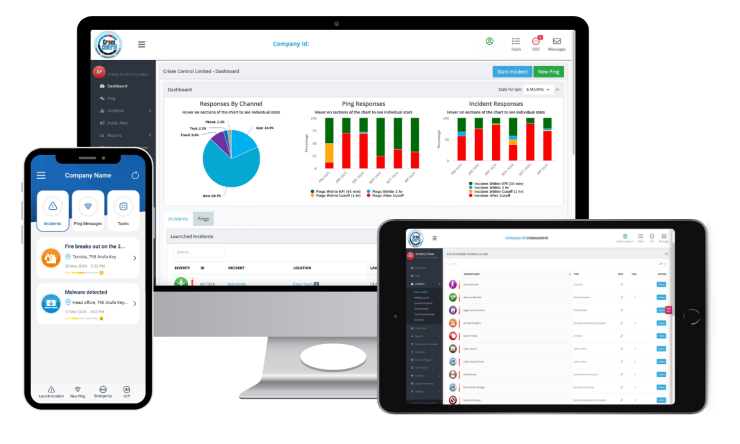
FAQs
1. What is an employee SOS panic button and how does it work on a construction site?
An employee SOS panic button is a one-press emergency alert mechanism, available as an in-app feature or a physical wearable device, that instantly notifies every designated responder when activated. On a construction site, pressing the button transmits the worker’s GPS location, triggers a pre-built emergency response plan, assigns tasks to named responders, and begins logging the incident timeline. It requires no call, no navigation, and no supervisor intervention to activate.
2. Can a panic button app work without mobile signal on a construction site?
The best panic button apps include offline queuing capability, which means the alert is stored locally and transmitted as soon as signal is restored. Physical workplace panic button devices can also operate over radio frequencies independent of mobile networks. When evaluating platforms for construction site deployment, signal-independence is a core requirement, not a premium feature.
3. How does an employee SOS panic button differ from calling 999?
Calling 999 alerts the emergency services. An employee SOS panic button alerts the emergency services and simultaneously activates the site’s internal emergency response, including first-aider dispatch, zone evacuation, personnel accountability, site access coordination, and management notification. It also begins the automatic audit trail that a 999 call does not provide. For serious construction site incidents, both are required. The panic button triggers the internal response and supports the external one.
4. How are subcontractors covered by a workplace panic button system?
Crises Control supports multi-employer site deployments, allowing subcontractor workforces to be pre-registered on the site’s emergency contact list and given access to the panic button app before they arrive on site. This means subcontractor operatives can both activate the emergency panic button if they witness or are involved in an incident and receive alerts if they need to respond to one. Coverage is site-wide, not employer-specific.
5. What regulations require construction sites to have an emergency panic button system?
No single regulation mandates the technology by name, but the Health and Safety at Work Act 1974, the CDM Regulations 2015, and RIDDOR collectively create a legal framework that a manual phone chain cannot reliably satisfy on a complex construction site. ISO 22320 provides the international standard for incident management that a panic button system implementing structured task assignment and audit logging directly fulfils. Many major clients and principal contractors now specify ISO 22320 alignment as a contract requirement.