Written by Anneri Fourie | Crises Control Executive
Construction sites rarely fail because risks are unknown. They fail because risks change faster than people can respond.
A site can start the day with a clear plan, approved permits, and all the right controls in place. By mid-morning, a delivery arrives early, weather conditions shift, a subcontractor works outside the agreed area, or a temporary structure is altered. None of these are unusual.
What turns these situations into serious incidents is delay.
Delay in recognising that conditions have changed.
Delay in informing the right people.
Delay in deciding what to do next.
Many construction organisations still rely on static plans, manual reporting, and informal escalation. These approaches struggle when conditions change quickly. The result is a gap between what the emergency response plan says should happen and what actually happens on site.
This article explains why that gap exists, what it costs in real terms, and how incident management software for construction supports faster escalation, clearer coordination, and more controlled response when pressure is high.
What incident management software for construction actually means
Incident management software for construction is a digital system that helps teams raise incidents, coordinate response actions, and record decisions as events unfold across one or multiple sites.
It comes into play when action matters most. Once a potential issue is spotted by site teams or monitoring tools, the system escalates the situation, notifies the right people, and manages the response in real time.
In simple terms, it turns incident response from a set of documents into a live, coordinated process. The key difference from traditional safety tools is intent. Inspection apps and reporting tools focus on recording what happened. Incident management software focuses on managing what is happening now.
A well-designed system supports:
- Rapid escalation when site conditions change
- Real-time incident alerts for construction sites
- Clear ownership of response actions
- Time-stamped records of decisions and outcomes
Most serious safety failures are not caused by missing rules. They happen because information does not move clearly or quickly enough when risk increases.
Why construction sites struggle with real-time escalation
Conditions change faster than plans
Risk assessments are often completed at the start of a project or phase. They reflect known hazards at a specific point in time. Construction sites do not stay in that state for long.
Temporary works, plant movements, subcontractor activity, and weather introduce new risks throughout the day. When escalation relies on paper checklists or periodic reviews, emerging threats are easy to notice but slow to act on.
The issue is not awareness. It is response speed and coordination.
Workforces are distributed across locations and employers
Construction projects bring together permanent staff, subcontractors, agency workers, and visitors. Decision-makers may be based off-site while incidents unfold on the ground.
Emergency communication for contractors and multi-site construction projects is often inconsistent. Contact lists are incomplete. Roles are unclear. Messages move through phone calls, radios, emails, and informal messaging apps. Information fragments quickly.
Without a central system, escalation depends on who is available rather than who is responsible.
Pressure changes behaviour
When something starts to go wrong, people try to fix it locally. Site managers may delay escalation to avoid disruption. Senior leaders receive partial updates or hear about issues after key decisions have already been made.
Over time, this creates a pattern where escalation happens after an incident has caused harm, delay, or regulatory attention.
The real cost of delayed escalation
Delayed escalation in construction incidents increases harm, disrupts operations, and weakens compliance oversight.
The practical consequences are well understood:
- Injury risk rises when issues are not escalated early
- Projects experience avoidable delays and rework
- Trust is lost with clients and regulators
- Organisations struggle to prove what actions were taken and when
Post-incident reviews often show the same pattern. Warning signs were visible. People noticed changes. There was no clear, trusted way to escalate concerns in real time.
Manual approaches versus digital incident management
Many construction firms still rely on manual or semi-digital processes. On paper, these systems appear adequate. Under pressure, their limits become clear.
Where manual approaches fall short
Common characteristics include:
- Paper-based hazard and incident logs
- Safety apps focused on inspections rather than live incidents
- Phone trees for escalation
- Email chains for updates
- Separate tools for communication and reporting
These approaches depend heavily on individual judgement and memory. They also fail when power or telecom services are disrupted.
What digital incident management changes
A digital platform brings escalation, communication, and response coordination into one place. Practical differences include:
- Central visibility of incidents across sites
- Automated alerts based on role and location
- Structured workflows for response actions
- Built-in records for audit and review
This does not remove human decision-making. It supports it by reducing uncertainty and delay.
Real-time incident alerts for construction sites
One of the most practical benefits of incident management software for construction is the ability to issue real-time incident alerts once an issue has been identified.
Effective alerting systems share clear characteristics:
- Multi-channel delivery via mobile app, SMS, voice, and email
- Role-based targeting so messages reach those responsible for action
- Location-based targeting to avoid unnecessary disruption
- Acknowledgement tracking to confirm messages are received
Alerts are only useful when they are trusted. Poor targeting or excessive messages quickly lead to alert fatigue. Speed alone is not enough. Alerts must be accurate, relevant, and linked to clear next steps.
Crises Control supports this approach through a mass notification system for the construction industry that remains accessible via cloud-based delivery and mobile access, even when primary systems are unavailable.
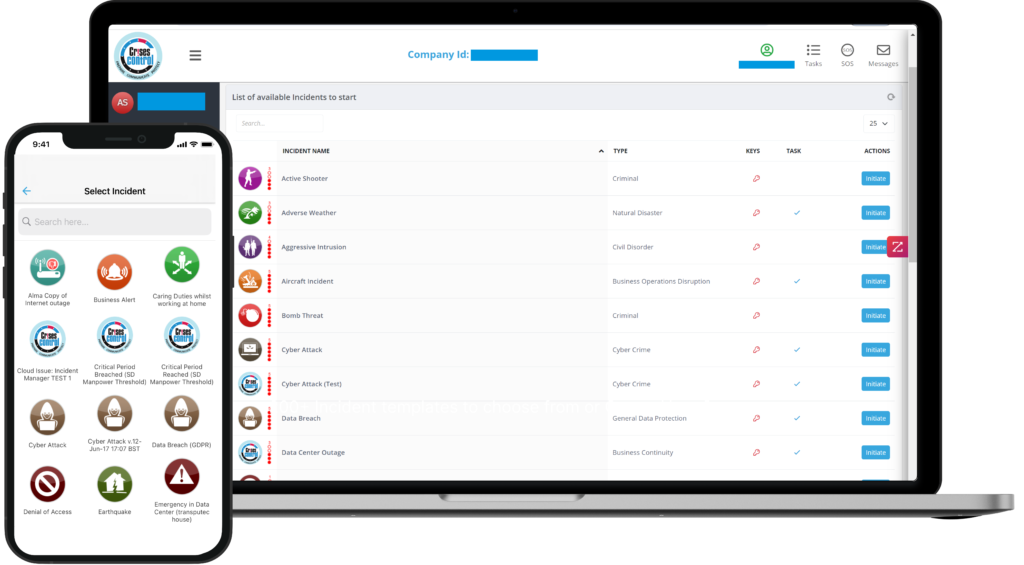
Interested in our Incident Management Software?
Flexible Incident Management Software to keep you connected and in control.
Escalation logic that reflects real construction operations
Escalation paths on construction projects are rarely linear.
Emergency response plans often assume a clear chain of command. Real projects involve joint ventures, principal contractors, subcontractors, and specialist teams. Authority can change depending on the situation.
Static escalation charts struggle to reflect this reality. They also fail when key individuals are unavailable.
What practical escalation looks like
More resilient escalation models include:
- Triggers based on conditions, not just confirmed incidents
- Parallel notification to safety, operations, and leadership roles
- Task-based response actions with clear ownership
- Escalation by exception when acknowledgements are missed
Incident management software supports this by embedding escalation logic into workflows rather than relying on memory or improvisation.
Emergency response plans: why documents alone are not enough
Most construction organisations already have an emergency response plan. The issue is rarely the absence of a plan. It is the difficulty of applying it when conditions change quickly.
Common execution gaps
Traditional plans often suffer from:
- Storage as static documents
- Limited visibility during live incidents
- No real-time tracking of actions or decisions
- Heavy reliance on after-action reporting
During an incident, people do not search for lengthy documents. They need guidance that fits the moment and reflects what is actually happening on site.
Turning plans into live response
Digital platforms allow response plans to be translated into practical actions:
- Incident-specific workflows
- Pre-defined communication templates
- Live task assignment and tracking
- Centralised reporting during and after incidents
Crises Control supports this by helping organisations turn written plans into usable response processes that guide teams step by step.
Speed is not the same as control
A common assumption is that faster alerts always lead to better outcomes. Speed matters, but uncontrolled speed creates risk.
Too many alerts reduce trust. Poor targeting overwhelms people who cannot act. Conflicting messages create confusion at the worst possible time.
Effective incident management balances speed with relevance. Real-time incident alerts work best when they are precise and linked to coordinated response actions.
Compliance, audit, and operational resilience
Construction organisations operate under strict health and safety obligations. Regulators increasingly expect clear evidence of preparedness and response.
After an incident, organisations are asked:
- Who was informed
- When information was shared
- What actions were taken
- How decisions were made
Manual systems struggle to answer these questions with confidence. Reconstructed timelines are vulnerable to error and dispute.
Incident management software creates automatic records of:
- Alert delivery and acknowledgements
- Task assignments and completions
- Decision logs and updates
This supports regulatory reporting and internal review without adding pressure during live incidents.
Human factors under operational pressure
Technology does not remove human behaviour. Systems must work with it.
Effective tools are designed for real conditions:
- Simple mobile-first interfaces
- Clear prompts rather than open-ended instructions
- Minimal data entry during incidents
- Support for low-connectivity environments
Crises Control is often cited as an example of a platform built around these realities, with mobile access and cloud-based availability during disruptions.
How to escalate safety incidents on construction sites in real time
Escalation is a sequence, not a single action.
A practical approach includes:
- Recognition: Site staff identify a hazard or abnormal condition
- Initial alert: A real-time incident alert is sent to defined roles
- Assessment: Information is reviewed centrally with site input
- Task allocation: Response actions are assigned and tracked
- Ongoing communication: Updates are shared as conditions change
- Resolution and review: Actions are closed and records retained
Digital platforms support this flow without relying on improvised communication.
Selecting incident management software for construction
When evaluating systems, focus on operational fit rather than feature lists.
Key questions to ask:
- Does the system support live incident management, not just reporting?
- Can it reliably reach contractors and site teams?
- Does it remain accessible during power or telecom disruption?
- Are response actions tracked in real time?
- Are records created automatically and defensibly?
These questions reflect how construction sites actually operate.
Final thoughts
Construction safety depends on recognising change early and acting with clarity. Incident management software for construction supports this by connecting escalation, communication, and response into a single, usable process.
When systems reflect real working conditions, they reduce delay, confusion, and exposure. They also support earlier intervention, where issues are managed before they escalate into major incidents.
Talk to Crises Control
If you are reviewing how your organisation escalates incidents or coordinates response during disruptions, Crises Control can support that conversation with practical insight and real-world experience.
Request a FREE Demo