Written by Anneri Fourie | Crises Control Executive
A Simple Definition
Incident management software is a system that helps organisations manage disruptions in a structured way. It assigns roles, triggers actions, tracks progress, and keeps everyone aligned during an incident.
It does more than send messages. It turns plans into coordinated action.
The Problem Many Technology Teams Face
Most technology companies already use Microsoft Teams.
It is where conversations happen. It is where updates are shared. It feels like the natural place to manage an incident.
The problem is simple.
Communication is happening, but coordination is not.
During a live incident, teams often rely on chat threads, scattered updates, and individual judgement. This creates confusion at the exact moment when clarity is needed.
The solution is not to replace Teams. It is to support it with structure.
That is where incident management software becomes essential.
The Scenario: A Routine Deployment Goes Wrong
It is 09:12 on a Tuesday.
A software company rolls out a planned update to its platform. Within minutes, error rates increase. API requests begin to fail. Customers in different regions start reporting issues.
Engineers open Microsoft Teams.
“Seeing failures in EU region.”
“US latency is climbing.”
“Was this part of the deployment?”
More people join. More channels become active.
By 09:25, senior leaders are involved.
The questions come quickly:
- What exactly is affected?
- Which customers are impacted?
- Who is leading this response?
- Do we roll back now?
The organisation is active. People are engaged.
Yet there is no clear structure guiding the response.
The Pressure: Speed And Visibility
Technology companies operate in environments where disruption spreads quickly.
- Customers notice issues within minutes
- Support teams are overwhelmed early
- Leadership expects immediate answers
At this point, the organisation needs more than updates.
It needs control.
Without it, teams react based on fragments of information rather than a shared understanding.
The Communication Challenge: Activity Without Direction
Microsoft Teams is doing its job.
Messages are flowing. People are sharing insights. Channels are active.
Still, a few patterns appear:
- No Clear Ownership: Several people are suggesting actions. No one has formal responsibility for leading the response.
- Fragmented Information: Key updates sit across different channels. Important decisions are difficult to trace.
- Unclear Escalation: Teams are unsure when to involve leadership or external stakeholders.
- Limited Visibility: There is no single view of what has been done and what is still pending.
- Missed Messages: Not everyone is in the right channel at the right time.
This is common in incidents.
Communication increases, but alignment drops.
Where Traditional Approaches Fall Short
Many organisations assume that collaboration tools can support incident response on their own.
This leads to:
- Heavy reliance on chat platforms
- Manual tracking of tasks
- Informal decision-making
- Inconsistent execution
This approach can work for small issues.
It struggles when incidents involve multiple teams, systems, or regions.
This is often when companies begin looking at incident management software for technology companies as they grow.
A Common Misconception
“If Everyone Is Talking, We Are Managing The Incident”
This feels true in the moment.
It is not.
Teams are sharing information, but they are not always coordinating action.
Most organisations do not struggle with communication.
They struggle with turning communication into controlled execution.
Effective incident management requires clear roles so everyone knows who is responsible, defined workflows that guide what needs to happen and when, controlled actions to ensure tasks are executed in a coordinated way, and traceable decisions so every step taken can be reviewed and understood.
Without these, teams are reacting, not managing.
The Turning Point: Introducing Structure
Back to the scenario.
At 09:30, the organisation shifts its approach.
Instead of relying only on Teams, it activates a structured incident response plan.
Here is what changes.
- Roles Are Assigned: An Incident Commander is clearly defined. Everyone knows who is leading.
- Actions Are Triggered: Tasks are assigned automatically to engineering, operations, and communication teams.
- Communication Becomes Targeted: Alerts are sent to the right people, not broadcast to everyone.
- Visibility Improves: Leadership can see progress in real time.
- Decisions Are Captured: Actions and outcomes are recorded for accountability.
This is the shift from conversation to coordination.
What This Means For Your Organisation
You cannot rely on communication tools alone. Response needs to be structured before an incident occurs, with clear plans and defined roles already in place. Execution is what determines the outcome, not just awareness of the issue. If your current process depends on chat to coordinate response, the gaps will become obvious during high-pressure situations.
How Structured Response Works In Practice
Modern incident management software provides a framework for managing incidents from start to finish.
Typical capabilities include:
- Activation of predefined incident plans
- Role-based task assignment
- Automated escalation
- Real-time progress tracking
- Integrated communication channels
Microsoft Teams still plays a role.
It becomes part of the communication layer.
This is where emergency communication software is valuable.
Teams delivers messages. The platform manages the response.
How To Manage Incidents Across Multiple Teams Using Microsoft Teams And Incident Management Software
Technology companies often ask how to combine existing tools with structured response.
A practical approach looks like this:
- Step 1: Define Your Incident Plans: Outline roles, responsibilities, and escalation paths in advance.
- Step 2: Digitise These Plans: Static documents are not usable during live incidents. Plans need to be actionable.
- Step 3: Use Teams As A Notification Channel: Send alerts and updates directly into Teams channels.
- Step 4: Manage Execution In A Dedicated Platform: Track tasks, ownership, and progress in one place.
- Step 5: Maintain A Single Source Of Truth: Avoid spreading information across multiple tools.
This approach keeps Teams familiar while adding control where it is needed.
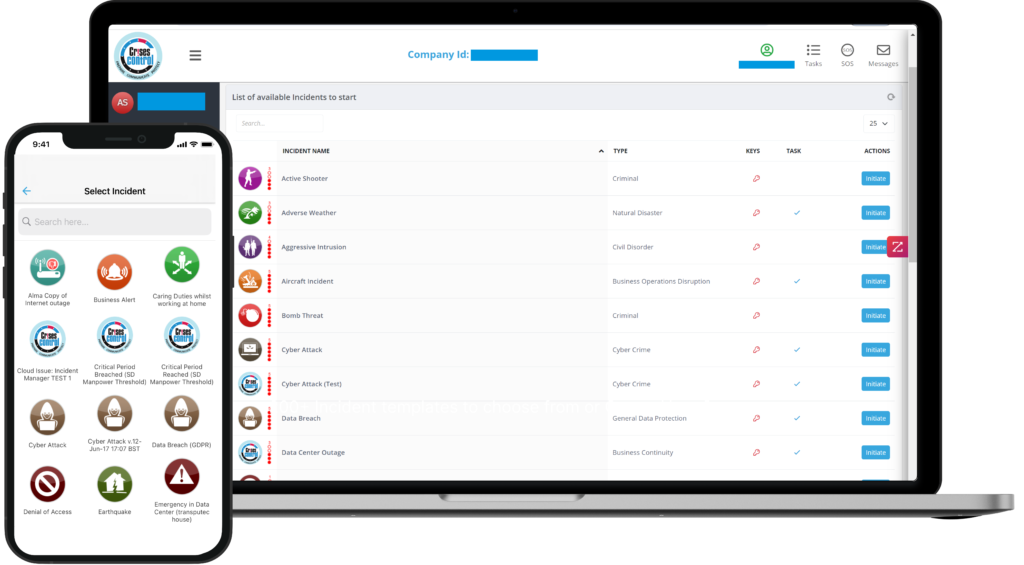
Interested in our Incident Management Software?
Flexible Incident Management Software to keep you connected and in control.
Why Microsoft Teams Is Not Enough For Crisis Communication And Incident Response
Microsoft Teams supports collaboration well.
It was not built to manage structured incident response.
The limitations include a lack of built-in incident workflows, no structured way to orchestrate tasks, limited visibility across teams, no reliable audit trail to track decisions and actions, and a heavy dependence on manual coordination.
This creates risk during complex incidents.
Especially when multiple teams need to act at the same time.
The Operational Risk Of Unstructured Response
When organisations rely only on communication tools:
- Response slows down
- Critical actions are delayed
- Ownership becomes unclear
- Post-incident reviews lack detail
In regulated environments, this creates additional pressure.
Standards such as ISO 22301 and ISO 22320 expect organisations to demonstrate structured response processes.
Without a system in place, this becomes difficult.
From Documents To Action
Many organisations already have:
- Crisis management plans
- Business continuity procedures
- Emergency response documentation
The issue is not planning.
It is execution.
Static documents are difficult to follow during live incidents.
Digital platforms turn these plans into guided actions.
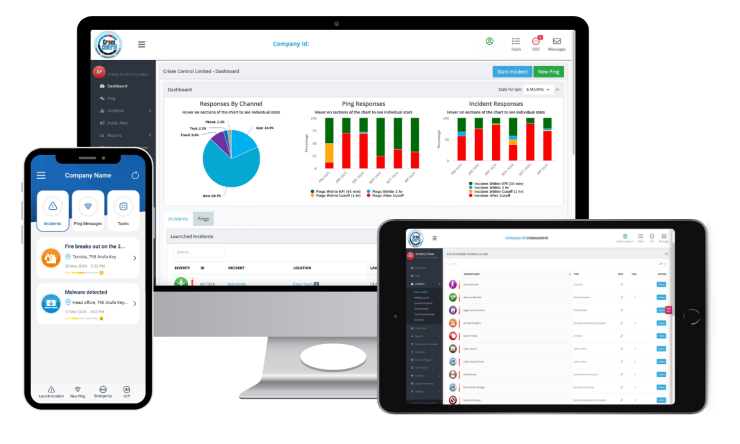
For example, platforms such as Crises Control help organisations:
- Break plans into clear steps
- Assign responsibilities automatically
- Provide access through cloud and mobile
- Maintain communication even if primary systems fail
This allows teams to act with clarity rather than guesswork.
Human Factors: Working Under Pressure
Incidents place people under pressure, and this directly affects how they think and act. Decision-making becomes slower or inconsistent, communication can lose clarity, and even well-trained teams may struggle to follow procedures as intended.
Structured systems help reduce this pressure by providing clear instructions, defined roles, and guided workflows. Instead of relying on memory or interpretation, teams are supported with a clear path forward, which helps them stay focused on resolving the problem.
Manual Vs Structured Response
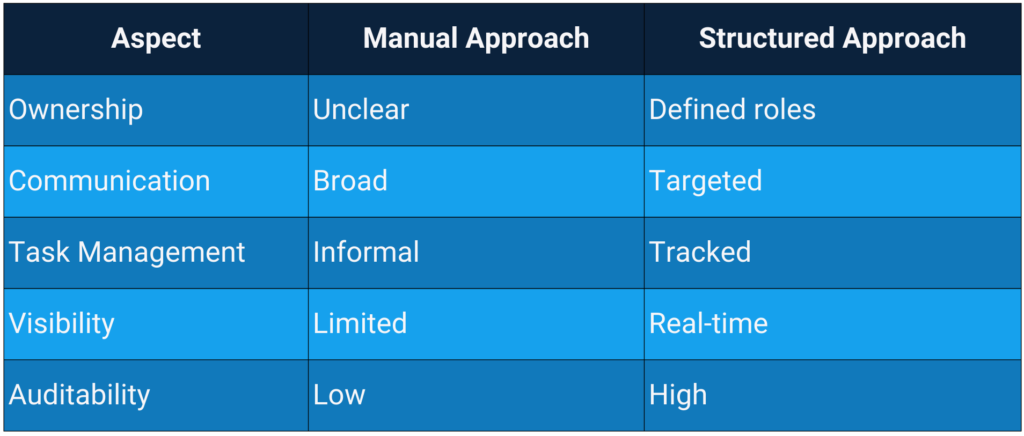
This is why organisations move beyond communication tools.
A Quick Answer Many Teams Ask
Is Microsoft Teams an incident management tool?
No. Microsoft Teams supports communication, but it does not provide structured workflows, role assignment, or coordinated response management.
Lessons For Technology Companies
From this scenario, a few clear lessons emerge:
- Communication Alone Is Not Enough: Messages do not replace structure.
- Structure Must Exist Before The Incident: You cannot build a response framework during a live event.
- Roles Drive Speed: Clear ownership reduces hesitation.
- Tools Must Support Execution: Not just conversation.
- Integration Is Key: Existing tools should work alongside structured platforms.
Evaluating Your Current Approach
Consider these questions carefully, as they often reveal how prepared your organisation really is during an incident.
- Can roles be assigned immediately, or does your team spend valuable time deciding who should take ownership?
- Do you have a single source of truth where everyone can see what is happening, or is information scattered across emails, chats, and calls?
- Can leadership track progress in real time, or are they relying on updates passed through multiple people?
- Are your plans truly actionable, with clear steps and responsibilities, or are they static documents that are difficult to use under pressure?
- And finally, do you rely on chat tools to coordinate response, hoping the right people see the right messages at the right time?
If these questions are difficult to answer with confidence, it often points to gaps in structure rather than effort. Teams may be working hard during incidents, but without a clear framework, that effort does not always translate into effective coordination or timely resolution.
Moving From Communication To Control
Microsoft Teams plays an important role in modern organisations.
It supports communication and collaboration.
It does not provide the structure needed to manage complex incidents.
This is where incident management software becomes critical.
By combining structured workflows with reliable communication channels, organisations can:
- Improve response speed
- Strengthen coordination
- Maintain operational control
Platforms such as Crises Control show how organisations can turn plans into live, role-based actions while using familiar tools like Teams as part of the communication layer.
Take The Next Step
If you are reviewing how your organisation manages incidents and want to move beyond communication-led response, it may be time to explore a more structured approach.
Request a FREE Demo