Written by Anneri Fourie | Crises Control Executive
The Problem And The Practical Way Forward
When something goes wrong on campus, communication often becomes the biggest challenge rather than the incident itself. A burst pipe, power outage, or safety concern can quickly turn into confusion if people do not know what is happening or what they should do next.
Many schools and universities still rely on email or informal messaging during disruptions. That works on a normal day. It does not work when networks are unstable, buildings lose connectivity, or staff are spread across large sites.
Mass Notification Software offers a practical way to keep people informed and coordinated even when infrastructure is under pressure. By using multiple communication channels and clear response workflows, organisations can reduce confusion and keep operations moving.
This article explores what happens during a real campus disruption, why communication often breaks down, and what organisations can do to strengthen their response.
What Is Mass Notification Software
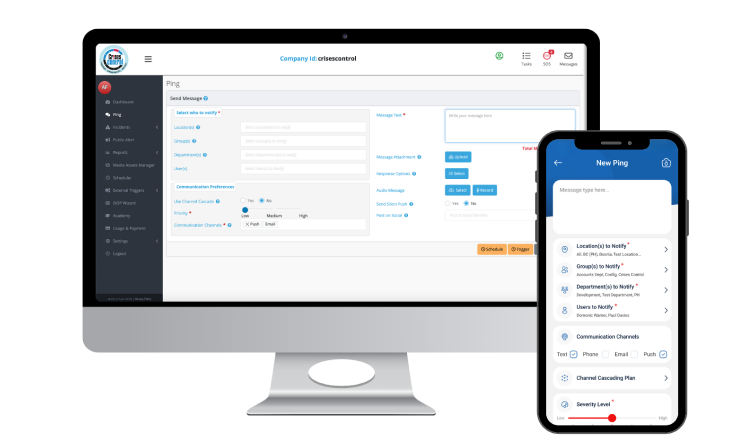
Mass Notification Software is a platform that allows organisations to send urgent messages across several channels at the same time. These channels can include mobile alerts, SMS, desktop notifications, voice messages, and email.
The goal is simple. Make sure the right people receive clear instructions quickly, even if one communication method fails.
In education settings, this supports staff coordination, student safety updates, and structured incident response.
A Realistic Campus Scenario
Early one morning at a large technical education campus, facilities teams discovered a major pipe burst in one of the main buildings. Water began spreading into corridors and classrooms, creating safety risks and forcing immediate decisions about building access.
At the same time, parts of the campus experienced unstable network connectivity due to the same infrastructure issue. Some staff could not access internal systems, while others had limited mobile signal.
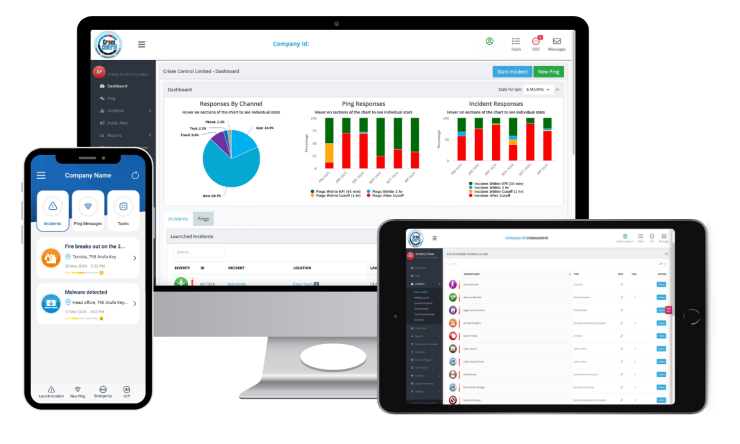
Staff reported the issue through an alert application on their devices. Leadership needed to decide which classes should be cancelled, which buildings could remain open, and how to keep staff and students informed.
Situations like this happen more often than many people realise. Campuses deal with infrastructure failures, demonstrations, missing students, and IT outages throughout the year. The difference between a smooth response and confusion often comes down to communication.
Why Incidents Create Immediate Pressure
An incident affects several groups at once. Leadership must make decisions quickly. Facilities teams need to manage the physical response. Teaching staff need clear guidance. Students need accurate information to avoid unnecessary travel or risk.
When communication is unclear, small problems become larger ones. People make assumptions, messages get repeated incorrectly, and teams lose time trying to confirm basic facts.
In this scenario, poor reception in certain buildings made coordination harder. Some staff did not receive emails. Others relied on word of mouth. Without a clear system, delays started to appear.
Communication Challenges During Infrastructure Failure
Many institutions rely on a mix of email, phone calls, and messaging apps during disruptions. These tools are useful day to day, though they are not designed for structured incident coordination.
Common issues include:
- Messages arriving at different times
- No visibility into who has read or acknowledged updates
- Teams working from different information
- Difficulty tracking decisions
An emergency communication system for universities needs to provide both reach and clarity. It must ensure messages arrive quickly and give leadership a clear picture of what is happening.
Where Traditional Approaches Fall Short
A common belief is that having several communication tools creates resilience. In reality, it often creates fragmentation. Each tool holds part of the picture, leaving teams without a clear view of the situation.
During network instability, relying on a single channel like email becomes risky. Messages may not send or may remain unread for long periods.
Mass notification software for schools addresses this by sending messages across multiple channels at once and tracking responses. This creates a shared understanding of the situation.
Multi Channel Emergency Communication When Networks Fail On Campus
In the campus scenario, operational teams activated predefined incident templates to coordinate actions. Notifications were sent through mobile alerts, SMS, and desktop messages so staff received instructions regardless of connectivity.
This approach meant that even staff working in areas with poor reception still received updates through at least one channel.
Multi channel emergency communication when networks fail on campus helps organisations:
- Deliver consistent instructions
- Track acknowledgement
- Keep teams aligned
- Reduce confusion
Clear communication supports faster decision making and helps maintain safety.
A Structured Response Approach
Organisations with mature response processes often follow a clear framework.
- Rapid Incident Activation: Staff report issues through a digital alert tool, which triggers notifications to relevant teams.
- Role Based Coordination: Facilities, IT, safeguarding teams, and leadership receive tailored instructions based on their responsibilities.
- Real Time Visibility: Dashboards show what actions are underway and which tasks are complete.
- Continuous Updates: As the situation evolves, new updates are shared so everyone remains informed.
Platforms like Crises Control allow organisations to embed their business continuity plans into these workflows so response actions follow a clear structure rather than being improvised.
Interested in our Ping Mass Notification Software?
Efficiently alert everyone in seconds at scale with our Mass Notification Software.
Testing Assumptions About Communication Failures
Many organisations assume communication breaks down mainly because of technology issues. In practice, unclear roles and activation processes often play a bigger part.
Even with strong networks, confusion can arise if staff are unsure who should act or how incidents should be escalated.
Clear workflows and defined responsibilities are just as important as reliable communication channels.
How Mass Notification Software Helps Schools Communicate During Network Outages
When reception is inconsistent, redundancy becomes essential. Sending messages through several channels increases the chance that instructions reach staff and students quickly.
This provides:
- Reliable communication during outages
- Visibility into message delivery
- Less reliance on manual coordination
- Faster alignment across departments
Maintaining communication continuity reduces disruption and supports safer outcomes.
Lessons From The Scenario
The campus incident highlights several practical lessons.
Communication planning should assume network disruption rather than perfect connectivity. Incident workflows should be prepared in advance rather than created during a crisis. Leadership needs visibility into response actions to make informed decisions.
Institutions that digitalise their plans are better prepared to respond quickly and maintain coordination.
Compliance And Duty Of Care Expectations
Schools and universities must demonstrate that they can protect staff and students during emergencies. Clear communication records and documented response timelines support this responsibility.
An emergency communication system for universities helps organisations maintain records of decisions and actions, which supports reviews after incidents.
Practical Questions For Decision Makers
Leaders reviewing their current approach should consider a few key questions.
- Can we communicate effectively if our main network is unavailable?
- Do we know who has received and acted on instructions?
- Are roles clearly defined during incidents?
- Can we demonstrate our response timeline if needed?
Uncertainty in any of these areas may indicate gaps in preparedness.
Strengthening Resilience Through Digital Planning
Digital platforms help organisations turn written plans into coordinated actions. They support role based response, reliable communication, and cloud access during disruptions.
Crises Control supports organisations by enabling teams to activate plans quickly, send alerts across multiple channels, and maintain visibility into response activities. This helps reduce confusion and improve coordination during incidents.
Final Thoughts
Communication breakdowns rarely come from a single issue. They often result from unclear processes and reliance on limited communication channels. When infrastructure is under pressure, these gaps become more visible.
Mass Notification Software provides a structured way to keep people informed and coordinated during disruptions. By using multiple communication channels and clear workflows, organisations can reduce confusion and support safer outcomes.
Organisations reviewing their preparedness should consider whether their current approach supports coordinated response under real world conditions. Crises Control helps teams move from manual communication to structured incident coordination with clear visibility and reliable messaging.
To learn more about how structured communication can strengthen your resilience strategy, contact Crises Control.
Request a FREE Demo