
Written by Dr Shalen Sehgal | Crises Control CEO
Crisis management software for manufacturing companies gets its real test at 2 AM. Not in a vendor demo. Not during an audit. At 2 AM, when an alarm fires on the floor, the crew is half the usual size, and the person whose name is in the emergency plan walked out the door six hours ago.
That is the moment that separates software that works from software that looks good in a meeting room.
Most manufacturers have something in place. A notification tool. A shared WhatsApp group. An emergency contact list on a laminated sheet near the fire exit. Some have invested in a proper platform. And yet when you look at how manufacturing incidents actually unfold, the same communication breakdowns appear again. Not because the people failed. Because the tools did.
This guide will help you choose software that does not fail. No jargon. No feature list of paddings. Just the four things that actually matter, the three questions that cut through any sales pitch, and what good looks like in practice.
Why So Many Manufacturers End Up with the Wrong Software
Here is an uncomfortable truth. The crisis management software market is worth $9.28 billion globally (Straits Research 2024). A huge chunk of that money is spent on tools that were never designed for a factory floor.
Most platforms in this space were built for office environments. Desk workers. Stable internet connections. People who check their email. They work beautifully in those conditions. The average manufacturing facility does not resemble those conditions at all.
The demo always happens in the boardroom. The incident always happens somewhere else. If you have never asked a vendor to show you what their software does when your network is down and the person in the plan is unavailable, you have not seen the most important part of their product.
1.You bought it to tick a box
A lot of manufacturing companies choose crisis software to satisfy a requirement. An ISO 45001 audit. An insurer is asking for proof of an emergency communications plan. A regulatory inspection looming on the calendar. The software gets selected, the certificate gets filed, and nobody thinks about it again until something goes wrong.
The problem is that compliance-driven buying asks the wrong question. It asks: does this software exist? The right question is: does this software work under the specific conditions of our operation?
2.The demo was impressive. Your plant looks like that demo.
Vendors are very good at demonstrations. Clean data. Fast responses. Full team in the room. Every feature works perfectly. What they rarely show you is the software running on a degraded network, routing a task to someone who came on shift 45 minutes ago, and escalating automatically when that person does not respond.
That scenario is not an edge case. It is Tuesday morning at a manufacturing plant. If the demo does not include it, the demo is not telling you what you need to know.
3.Sending an alert is not the same as running a response
This is the most common mistake. Measuring a crisis platform by how fast it sends a notification is like measuring a fire extinguisher by how quickly you can pull the pin. The pull is one second. The fire is everything after.
Every platform in this market sends alerts quickly. That is a solved problem. What is not solved, and what most platforms do not even attempt, is everything that happens in the minutes after the alert goes out. Who picks up the task? Who confirms it is done? Who can see the full picture right now? That is where incidents are contained or lost.
Research from ARC Advisory Group found that 30 percent of manufacturing downtime comes from human error in manual processes. Most of that error happens in the first few minutes of an incident, when people are trying to figure out who to call, what to do first, and whether anyone else is already on it. The right software removes that guesswork entirely.
Interested in our Incident Management Software?
Flexible Incident Management Software to keep you connected and in control.
Four Things Crisis Management Software for Manufacturing Companies Actually Needs to Do
Forget the feature lists for a moment. Here are the four outcomes your software must deliver. If it cannot do all four, it is not the right tool for a manufacturing environment.
1. Work when your network does not
Equipment failures, fires, and cyberattacks on your operational systems can all take your internal network down. If your crisis software runs through that same network, it disappears exactly when you need it most. The right platform runs on its own cloud infrastructure, entirely separate from your plant systems. It reaches people by text, voice call, and push notification simultaneously through PING, so if one channel fails, three others still work. Your crisis software should be the last thing standing when everything else goes down.
2. Find the right person, not just the right name
Your emergency plan has names in it. Your shifts have people in them. Those are often different sets of people. When an incident happens at 11 PM, the name in the plan might be three time zones away on annual leave. Purpose-built crisis management software for manufacturing companies assigns jobs to whoever currently holds each role on the active shift, not to a named individual. If that person does not respond within a set time, the incident management platform automatically moves to the next person in line. No phone calls. No checking a spreadsheet. No discovering mid-incident that your first call went to someone who retired.
3. Actually run the response, not just announce it
An alert tells people something is happening. A response is what they do about it. The difference between software that notifies and software that coordinates is the difference between a fire alarm and a fire brigade. When a real incident fires, the right platform assigns specific tasks to specific roles, tracks who has picked them up, shows the incident commander a live view of what is done and what is not, and escalates anything that is falling behind. See how this plays out in practice across a real manufacturing incident.
4. Write the incident report for you
After an incident, regulators want to know exactly what happened, when it happened, and what you did about it. OSHA, RIDDOR, ISO 45001: they all require documentation. In most facilities, this report gets reconstructed from memory the next morning by exhausted people who were in the middle of it the night before. The right software logs every message sent, every task assigned, every acknowledgement received, every escalation triggered, all with timestamps, automatically, as the incident unfolds. By the time it is over, the report already exists. You just need to send it.
Here is the honest picture. Some platforms are very good at getting alerts out fast. Others are built for writing plans and documenting risks. Most of the tools your teams already have on their phones were never designed for a crisis at all. Crises Control sits in the gap between the alert firing and the incident closing. That gap is where most facilities are on their own.
Three Questions That Cut Through Any Crisis Software Demo
You do not need a 40-point evaluation checklist. You need three questions. Ask these of every vendor and the answer will tell you almost everything.
Ask: what does your software do in the four minutes after the alert goes out?
This is the question that separates notification tools from response platforms. A notification tool sends the alert and stops. A response platform starts a coordinated sequence: tasks go to the right people, acknowledgements are tracked, the incident commander gets a live dashboard, and anything not picked up escalates automatically. If the vendor’s answer to this question is vague, their software stops at the notification.
Ask: what happens if the named contact is not available?
Name a specific scenario. Your head of safety is on holiday. It is Sunday night. An alarm fires. What does the software do next? The answer should be: it automatically routes the task to whoever holds that role on the current shift roster. If the answer involves someone manually looking up a backup number, the software has recreated the exact problem you bought it to solve.
Ask: does it work when our internal systems are down?
Get a direct answer. Some platforms say they are cloud-based but still require your VPN, your Active Directory login, or your corporate email to function. In a manufacturing incident that has knocked out your internal infrastructure, which happens more often than most companies want to admit, those dependencies make the platform useless. You need software that operates on its own infrastructure entirely, reaches people via text and voice when digital channels are unavailable, and does not care whether your corporate network is up.
One more thing worth knowing: Siemens’ True Cost of Downtime 2024 report puts the average cost of unplanned downtime in the automotive sector at $2.3 million per hour. The average large manufacturing plant has 25 unplanned downtime incidents per month. The cost of choosing the wrong crisis software is not the licence fee. It is every extra minute of uncontrolled escalation that the right software would have shortened.
What This Looks Like in Practice
Crises Control is crisis management software for manufacturing companies built around the realities of the factory floor, not the conditions of a boardroom demo.
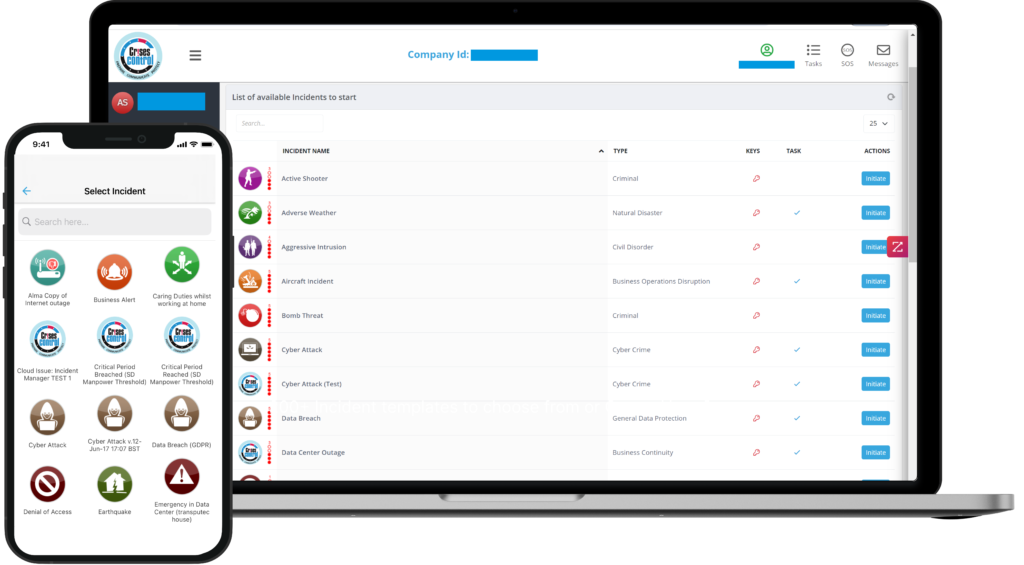
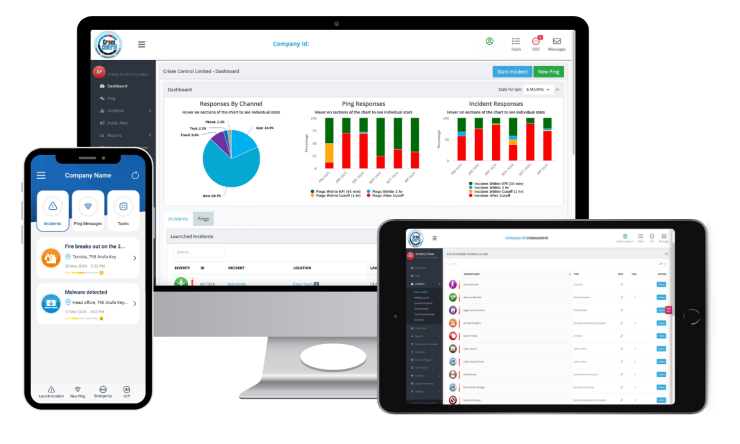
When an incident is declared, alerts go out simultaneously by text, voice, push notification, and email via PING. Tasks go automatically to whoever is on the current shift in each relevant role. If a task is not picked up within the time you have set, it moves to the next person automatically. The incident commander sees everything in real time on one dashboard.
The whole response is logged as it happens. No reconstruction. No chasing people for their account of events the next day. The record exists, timestamped, and complete, from the first alert to the last task closed.
The platform runs on its own infrastructure. When your network goes down, it keeps going.
If you want to see it tested against the specific scenarios your facility actually faces, request a demo and we will walk through your real conditions, not ours.
FAQs
1. What is crisis management software for manufacturing companies?
Crisis management software for manufacturing companies is a platform that handles the full arc of a workplace incident: getting the right people notified, making sure the right tasks are picked up, giving someone a live view of what is happening, and creating a complete record of it all automatically. It is different from a basic notification tool because it does not stop at the alert. It coordinates everything that follows.
2. 2. How is it different from just using Microsoft Teams or WhatsApp?
Teams and WhatsApp are communication tools. They were built for everyday conversations, not crisis response. They have no way to route a task to whoever is on shift right now, no automatic escalation when someone does not respond, no live operational dashboard showing what is done and what is not, and no automated record of the response that satisfies a regulator. Using them in a serious incident is like navigating with a paper map because your GPS is off. It might work. It probably will not.
3. What does good crisis management software actually do when an incident happens?
Within seconds of an incident being declared, it sends alerts across multiple channels simultaneously, assigns the first response tasks to whoever is currently on shift in each role, starts tracking acknowledgements, activates the pre-built response plan for that type of incident, and gives the incident commander a live view of the entire response. Every step is logged automatically. It does not wait for someone to make a phone call or check who is on the roster.
4. Why do so many manufacturers end up with the wrong platform?
Usually because the buying decision was made to satisfy a compliance requirement rather than to solve an operational problem. A platform that produces good documentation for an auditor does not necessarily perform well when an alarm fires at midnight on a Sunday. The three questions in this guide will tell you very quickly whether the platform you are evaluating was built for the real conditions of your operation.
5. How does the software handle OSHA and regulatory documentation?
OSHA’s recordkeeping requirements need a clear, timestamped account of what happened and what was done in response. Good crisis management software for manufacturing companies builds this record automatically as the incident unfolds. Every alert sent, every task assigned, every response received, every escalation triggered: all logged with timestamps in real time. By the time the incident closes, the compliance documentation already exists. There is nothing to reconstruct.